
Plans & Pricing
Mole Hash bills the account owner — the person who creates sites. Everyone invited to those sites works under the owner's plan and limits and never sees pricing. The Plans & Pricing page shows your current plan and usage, explains how credits are spent, lets you check whether you qualify for the free Ordina Pool plan, and upgrades you through a secure checkout, monthly or yearly.
Where: sidebar Plan → Plans & Pricing · account owner or superuser only. Members of other people's sites do not see the item. The Billing & Plans tab of Settings shows a shorter version of this page.
What you see
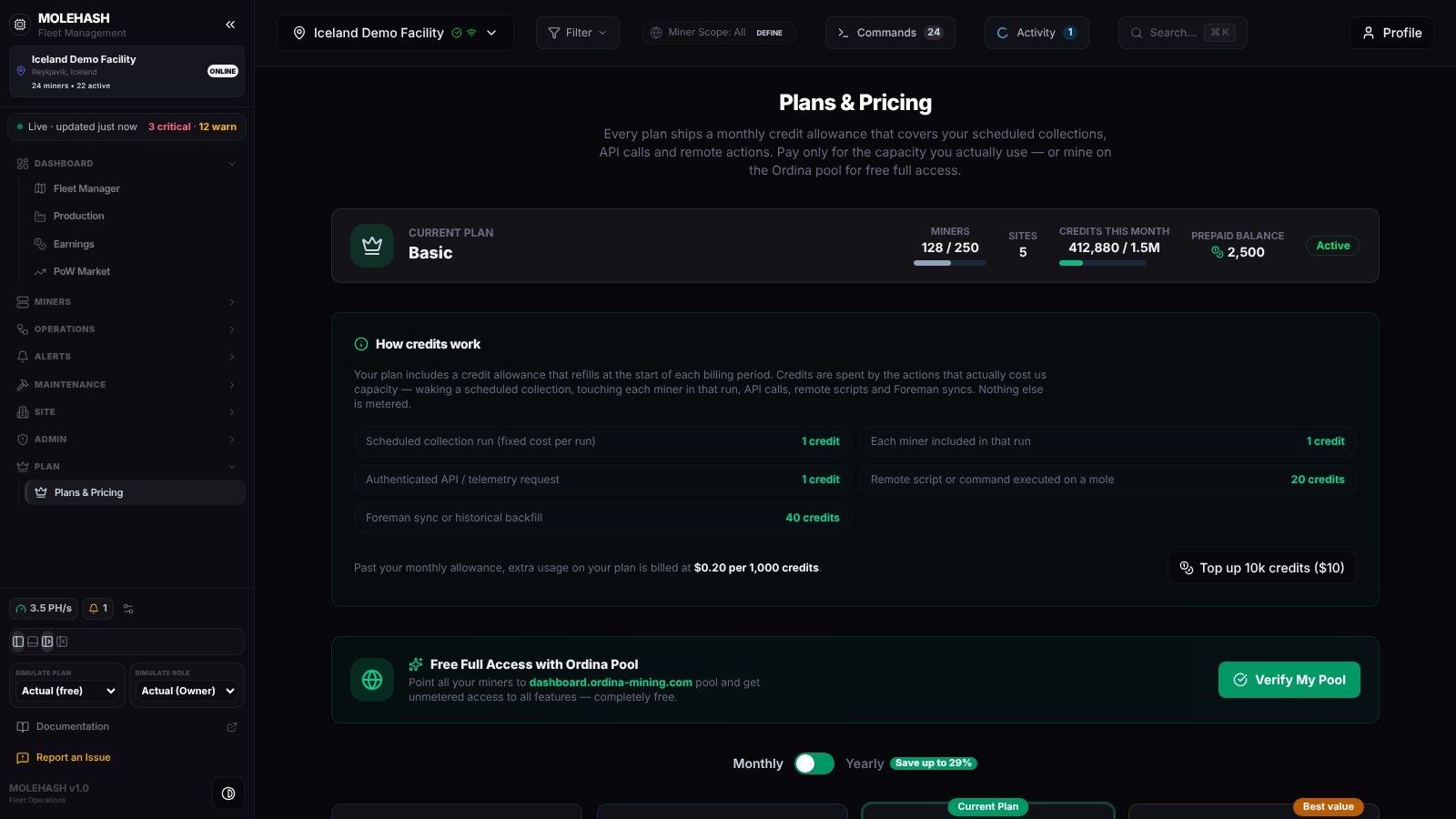 The demo account on the Basic plan: usage strip, credit costs, the Ordina Pool offer and the plan cards starting below.
① Current Plan strip — your plan name, Miners used / max with a bar (amber above 70 %, red above 90 %), Sites allowed, Credits this month used / allowance, your Prepaid balance and an Active or Free Tier badge. The strip is shown only once your subscription has been loaded.
② How credits work — the per-action cost table, your plan's overage rule (extra usage on your plan is billed at $0.20 per 1,000 credits on the demo) and the Top up 10k credits ($10) button.
③ Free Full Access with Ordina Pool — the partner offer and the Verify My Pool button.
④ Monthly / Yearly toggle — with a Save up to N% badge.
⑤ Plan cards (below) — one card per plan: price (in yearly mode the per-month equivalent and the annual total), credits included per month, the limits, the overage line and a button: Current Plan, Upgrade to <Plan>, Included for the free tier, or Plan change unavailable when your subscription could not be loaded. A Frequently Asked Questions section closes the page.
When the catalogue or your status cannot be loaded, the page shows Plan catalogue unavailable / Plan unavailable with a Retry button. Nothing is charged or changed in that state.
Plans and limits
| Free | Lite | Basic | Premium | Ordina Pool | |
|---|---|---|---|---|---|
| Price per month | $0 | $14 | $89 | $349 | $0 (partner) |
| Price per year | — | $126 | $799 | $2,990 | — |
| Miners | 10 | 25 | 250 | 2,000 | unlimited |
| Sites | 1 | 2 | 5 | 15 | unlimited |
| Credits per month | 10,000 | 60,000 | 1,500,000 | 25,000,000 | unlimited |
| Scheduled tasks | 1 | 3 | 15 | 50 | unlimited |
| Shortest task interval | 60 min | 30 min | 10 min | 5 min | 1 min |
| Hosting clients | 0 | 0 | 5 | 50 | unlimited |
| Extra usage per 1,000 credits | not available (hard stop) | $0.50 | $0.20 | $0.08 | — |
| Custom roles per site | 1 | 10 | 10 | 10 | 10 |
The Ordina Pool plan is not sold: it is granted when all your miners mine on the Ordina pool (see below). A prepaid top-up of 10,000 credits for $10 can be bought at any time, on any plan.
What costs credits
| Action | Cost |
|---|---|
| Waking a scheduled collection run | 1 credit |
| Each miner included in that run | 1 credit |
| A request to the platform's API | 1 credit |
| A remote script or command run on a Mole agent | 20 credits |
Nothing else is metered. The allowance refills at the start of each billing period. On plans with extra usage, going over keeps working and is billed per 1,000 credits; on Free, metered actions stop until the next period, an upgrade or a top-up. Prepaid credits are spent before the monthly allowance.
How to …
How to upgrade
- Choose Monthly or Yearly with the toggle, then click Upgrade to <Plan> on the card.
- You are taken to the checkout page. Once the payment goes through, your plan is set, the subscription is marked active and your credit allowance is reset; you come back to the page you left.
- Cards priced below your current plan read Included in your plan: downgrades are not sold here. To cancel, use the subscription management of the payment provider; the plan reverts at the end of the paid period.
How to buy a credit top-up
Click Top up 10k credits ($10) and complete the checkout. Your prepaid balance grows by 10,000 credits.
How to get the free Ordina Pool plan
- Point every miner you own at the Ordina pool (
dashboard.ordina-mining.com) and let them submit shares. - Click Verify My Pool. Every miner must have the Ordina pool among its configured pools with at least 100 accepted shares (or as its primary pool when it has not reported yet).
- If every miner qualifies and you are not on a paid plan, your account switches to Ordina Pool with unlimited limits. The result lists up to 10 miners that do not qualify, with the reason. If you are on Ordina and a miner moves away, you drop back to Free. Paying subscribers are never moved automatically.
What the plan limits
| Limit | What happens |
|---|---|
| Miners | Adding a miner beyond the plan's maximum is refused with Plan limit reached. The count is the owner's, across all their sites. A banner at the top of the dashboard warns the owner at 80 % (Free, Lite), 70 % (Basic) or 90 % (Premium) and turns red at the limit. |
| Scheduled tasks | Creating or editing a task checks the number of tasks and the shortest interval; the Scheduled Tasks page shows Plan Limit Reached. |
| Custom roles | 1 on Free, 10 on the other plans. |
| Credits | Collection runs, API requests and remote scripts are charged; on Free they stop at the allowance. |
| Agent download | The ready-to-run Mole Hole Windows Agent in Settings → Billing & Plans needs a paid plan. |
| Sites | The maximum is shown with the plan; in this build creating a site is not blocked by it. |
Limits always follow the site owner's plan: an invited member on a Premium site is not held to their own Free plan, and members never see upgrade prompts (they read The site owner can upgrade the plan).
Good to know
- Every figure on the page comes from the live plan catalogue; the table above reflects the configuration at the time of writing.
- Every button says Plan change unavailable? Your subscription could not be loaded. Click Retry before drawing conclusions.
- Verify My Pool says a miner is missing: it needs the Ordina pool in its pool slots and 100 or more accepted shares there; a freshly pointed miner qualifies once the agent reports its shares.
- A plan set by a superuser in User Management shows as unlocked without a paid subscription; a later payment event for your account can overwrite it.
- Transferring a site to another owner moves its miners under their plan limits.
- Superusers have no plan: their status reads Platform administrator with unlimited limits.
Related
- Settings — Billing & Plans tab, agent download.
- User Management — manual plan assignment.
- Roles & permissions
- Scheduled Tasks