
Issues
The Issues panel answers "which miners need attention right now, and why?". Each scan checks every deployed miner of the site against the built-in system issues (zero hashrate, hashrate too low, temperature too high, missing hashboard, pool unreachable, agent offline …) and against your own custom rules, then groups the results by issue with the list of affected miners. The limits used for each miner come from its model unless you changed them on the miner's page, and per-miner ignore flags silence specific issues for machines you already know about.
Where: sidebar Alerts → Issues · needs the alerts:view permission to open the page · switching system issues on or off and managing custom rules need alerts:manage.
What you see
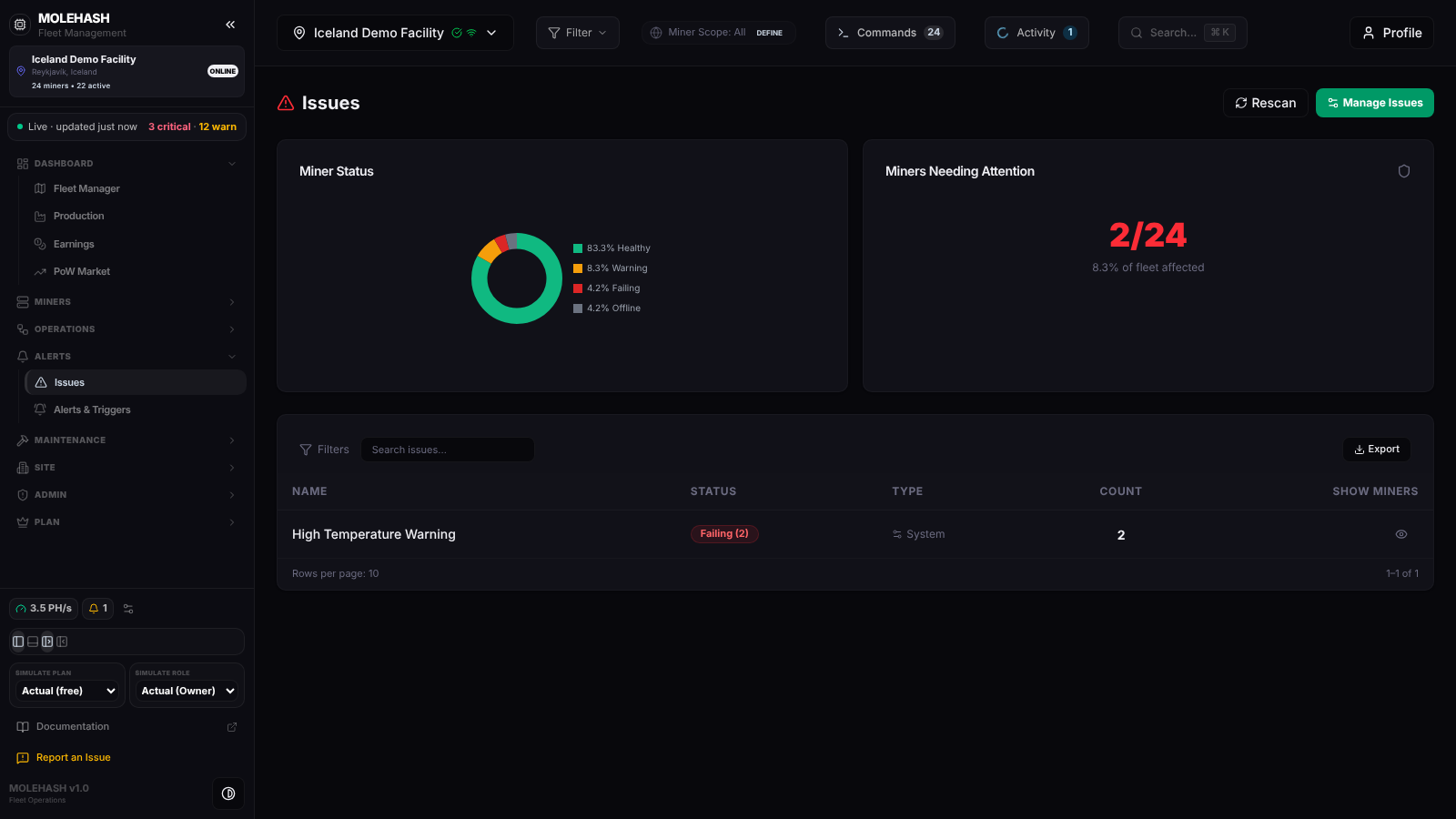 Issues on the Iceland Demo Facility: 2 of 24 miners need attention, one high-temperature issue is failing on 2 miners.
① Header — Rescan runs the check again on the spot; Manage Issues opens the rules panel (see below).
② Miner Status ring — the fleet split by health, each label with its share: Healthy (no issue), Warning (only warning-level issues), Danger (at least one failing issue), Disabled (disabled miners or miners whose state is not Deployed — these are not checked at all), Pending (never seen yet, or never mined). No miner data when the site has no miners.
③ Miners Needing Attention — 2/24 in red with 8.3 % of fleet affected, or green with All miners healthy. A miner counts once however many issues it has.
④ Issues table — a Search issues... box (by name) and Export (a CSV with Name, Status, Type, Count). Rows are sorted by count, highest first. Empty state: No issues detected — all miners healthy!
| Column | Meaning |
|---|---|
| Name | The issue and its one-line description. |
| Status | Failing (n) in red and/or Warning (n) in amber — how many miners are at each level. Failing means the error threshold is crossed (or a yes/no issue such as a missing board is true); Warning means only the warning threshold is crossed. Custom rules only have Failing. |
| Type | System (built-in) or Custom (your rule). |
| Count | Affected miners, failing + warning. |
| Show Miners | The eye icon expands the row into one card per miner: name, IP, FAILING or WARNING, hashrate and temperature. |
The footer Rows per page: 10 · 1–n of n is informational; every row is shown.
The built-in issues
Unless noted, a miner must have reported in the last 15 minutes to be evaluated, and sleeping miners are exempt from hashrate, fan, board and pool checks.
| Issue | Level | Fires when | Can be ignored per miner |
|---|---|---|---|
| Abnormal Hash Rate | warning | Hashrate above 130 % or below 10 % of the model's nominal. | |
| Duplicate MAC | warning | Another miner has the same MAC address. | Yes |
| Fan Speed Too High / Too Low | warning | Fan RPM outside the miner's fan ranges — off by default, enable them on the miner page. | |
| Hardware Errors Exist | warning | Errors counted in the last hour. | Yes |
| Hash Rate Too Low | danger | Below Warn less than (warning) or Error less than (failing). | |
| Invalid Pool Configuration | danger | The site has Trusted Pools rules and the miner's pool matches none. | |
| Miner Not Updating (Recent / — / Over 1 Day / Over 2 Days) | warning / danger | Last seen more than 15 min / 30 min / 24 h / 48 h ago. | |
| Miner Not Updating (Forever) | danger | Never seen, or added over an hour ago and never mined. | |
| Miner Rebooted | warning | Uptime under 10 minutes. | Yes |
| Missing Fan | danger | Fewer fans than the model expects (4 on recent Antminers, 2 on S9/T9 and other brands). | Yes |
| Missing Hash Board | danger | Fewer than 3 hashboards. | Yes |
| No Pools Configured | danger | No pool URL on the miner. | |
| Pool Unreachable | danger | Pool configured but disconnected or dead. | |
| No Shares Being Submitted | danger | The pool is rejecting the miner's shares. | Yes |
| Pickaxe Offline | danger | The miner's Mole agent (the "pickaxe") is offline. | |
| Temp Sensor Too High | danger | Above Warn greater than (warning) or Error greater than (failing). | |
| Zero Hash Rate | danger | Reporting, awake, pool connected, 0 TH/s. |
Default limits per model: hashrate error below 70 % / warning below 85 % of nominal; temperature warning above 90 °C / error above 95 °C; fan high warning above 7 000 / error above 7 600 RPM; fan low error below 1 500 / warning below 2 500 RPM (both fan ranges are off until you enable them).
How to …
How to see which miners are affected and act
- Click the eye icon on the issue row. One card per miner appears.
- Go to Machines, select those miners and use Bulk Command (reboot, change pool …), or open the miner's page for its history.
- Click Rescan afterwards to confirm the issue is gone.
How to switch a system issue off for this site
- Click Manage Issues. The Issue Rules Configuration panel lists System issues · n active, n inactive, each with its level badge, description and · can be ignored per miner when an ignore flag exists.
- Flip the switch on an issue. Toast <issue> disabled — for this site (or globally when no site is selected). The scan reruns immediately.
How to add a custom rule
- In the Issue Rules Configuration panel, click Add Custom Rule.
- Fill Rule Name; choose the Field (Hashrate (TH/s), Temperature (°C), Fan Speed (RPM), Power (W), Status, Pool Status, Pool URL, Last Seen, Uptime (seconds)); the Operator (Equals, Not Equals, Less Than, Greater Than, Less or Equal, Greater or Equal, Contains, Not Contains, Older Than (minutes) — the last one for Last Seen); the Threshold; the Severity (Info, Warning, Danger, Critical).
- Click Create Rule. Toast Rule Created; the rule appears under Custom rules as field operator threshold and the scan reruns. The 🗑 icon deletes a rule (Rule Deleted).
How to change the limits or silence an issue for one miner
Everything per-miner lives in the Edit miner dialog, described on the Miner page:
- Open the miner and click Edit miner.
- Under Alerting ranges, switch each range (Hash rate, Temperature, Fan high, Fan low) on or off and set Error less than / Warn less than or Warn greater than / Error greater than; model defaults puts a range back.
- Under Miner options, tick the ignore flags you need (hardware errors, missing boards, missing fan, reboots, duplicate MAC, bad shares) to silence that issue for this miner only.
- To take a miner out of evaluation entirely, set its State to In repair, Spare or Decommissioned, or untick Active (monitored).
- Save, then Rescan.
The Set Expected Hashrate / Temperature / Fan actions of the Bulk Command dialog set the error limits of many miners at once.
Good to know
- The scan runs when you open the page and when you click Rescan; there is no background refresh here. The same check runs on the platform every 2 minutes to keep the alert list and the Alerts & Triggers notifications up to date.
- A miner appears in several rows when it has several issues; Miners Needing Attention counts it once.
- Stock-firmware miners without a stored web password report no power or fan details, so the related issues stay silent for them.
- Access denied to this site's issues: you cannot view that site.
- Alerts raised by the log patrol (low voltage, power loss, fan failure … found in miner logs) are explained on the Activity page.
Related
- Alerts & Triggers — notifications when an issue newly appears
- Miner page — Edit miner: alerting ranges, ignore flags, state
- Machines — Bulk Command on the affected miners
- Activity — log patrol alerts