
Workers
The Workers panel answers which worker names are my miners mining under, and how many of those miners are really hashing? It groups the miners of the current site by the worker name set in their pool settings (for example molehash.rackA01), counts configured versus active miners per name, and tells you when some miners have no worker name at all.
Where: sidebar Site → Workers · needs the site:view permission · a site must be selected.
What you see
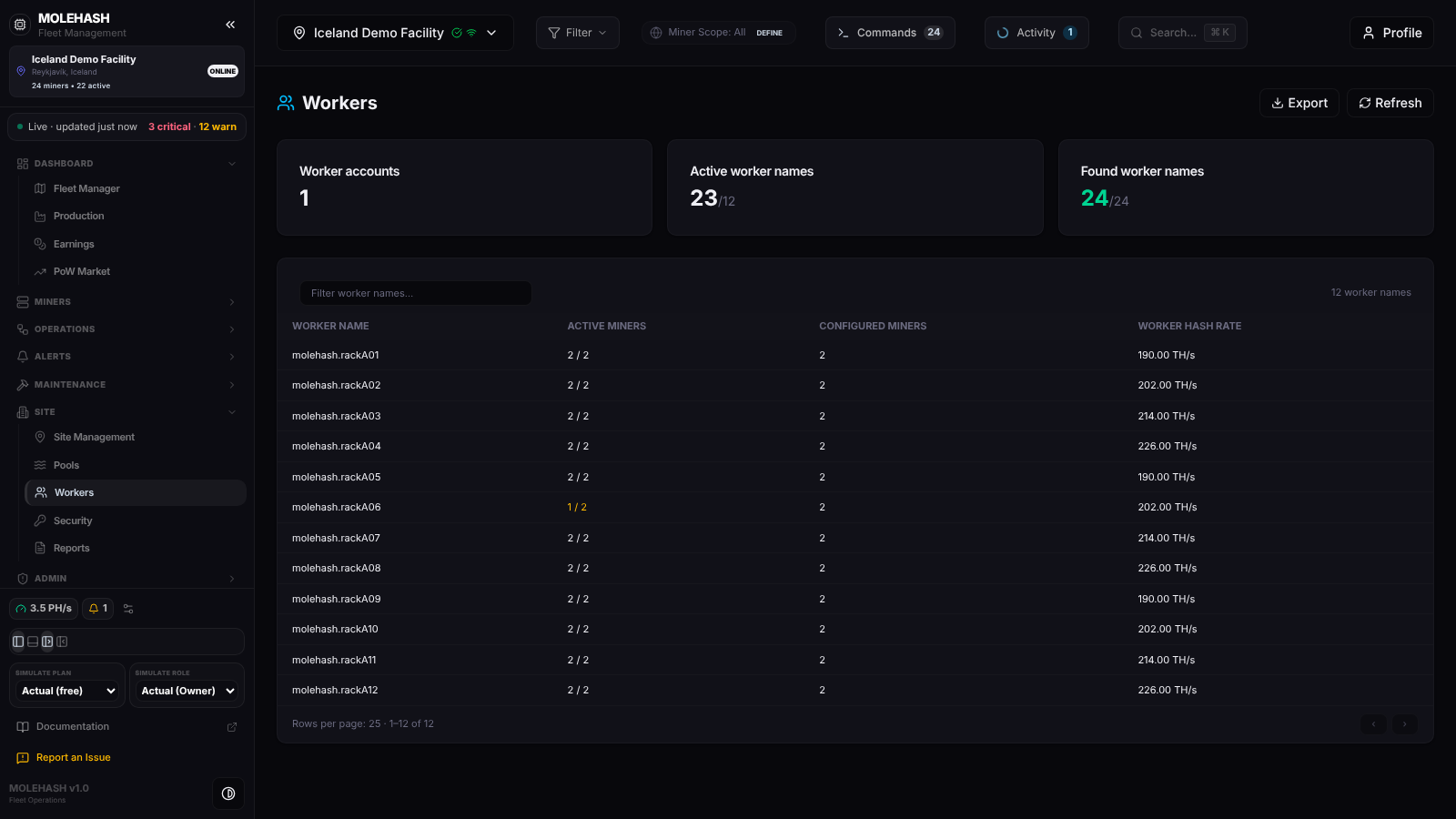 Twelve worker names on the demo site; one of them has a miner down.
① Header — Workers with Export (CSV) and Refresh.
② Summary cards
| Card | Meaning |
|---|---|
| Worker accounts | Distinct accounts, i.e. the part of the worker name before the first dot (1 on the demo: molehash). |
| Active worker names | Miners active under a worker name, over the number of worker names (23/12). |
| Found worker names | Miners for which a worker name was found, over the miners of the site (24/24). Green when every miner has one, red when some have none. |
③ Worker table — a Filter worker names… box and a count of matching names on the right.
| Column | Meaning |
|---|---|
| Worker name | The exact string configured on the miners (hover a long name to see it in full). |
| Active miners | active / configured. Amber when fewer miners are active than configured — rackA06 on the demo has 1 of 2. |
| Configured miners | Miners whose pool settings carry this worker name. |
| Worker hash rate | Current hashrate of those miners, in TH/s (PH/s above 1,000 TH/s). |
Rows are sorted by hashrate, 25 per page, with ‹ / › at the bottom. Clicking a row expands it to list the miners behind the name as name (ip) hashrate; inactive miners are in red. The first 20 miners are listed, then … +N. Empty state: No worker name found.
How to …
How to find a worker name
Type part of the name in Filter worker names…. The match ignores case and the table goes back to page 1. Use ‹ / › to browse pages of 25.
How to see the miners behind a name
Click the row. It expands with one line per miner; click again to collapse. Red lines are miners that are not active — the first place to look when the Active miners column is amber.
How to export the table
Click Export. A workers.csv file is downloaded with the columns Worker, Active, Configured, Hashrate TH/s for every row matching the current filter, all pages included.
How to fix a missing or wrong worker name
This panel is read-only. Change the worker on the miner itself from Miners → Machines (Edit Miner, pool settings), or send a Change Pool command from Operations → Commands to many miners at once.
Good to know
- The table loads when you open the panel or switch site, and on Refresh; it does not refresh on a timer.
- A miner counts as active when the Mole agent (older screens say "pickaxe") has seen it in the last 15 minutes and it reports a non-zero hashrate.
- A miner's worker name is taken from its pool username, or its stored worker name, or the user field of its first configured pool. Miners with none of these count in the Found worker names total but appear in no row.
- Found worker names in red: some miners have no pool settings reported yet (freshly discovered, or never answered the agent) or the pool entry has no username.
- One worker name shared by many miners is normal on pools that identify miners by IP, but it hides individual failures: the amber active / configured column is then your only signal.
- The hashrate shown is what the miners report, not what the pool credits; compare with the pool API connections on the Pools page.
- At most 2,000 worker names are shown.