
Alerts & Triggers
A trigger watches the issues of a site's miners and notifies you when a miner newly matches one of the issues you chose. You decide which issues and which level, how many miners must trip at once before you are told, how long to stay quiet afterwards, optionally which tags or models to watch, and through which channels to notify. Each trigger keeps its own history: what happened, when, which miners, which condition and whether each channel got the message.
Where: sidebar Alerts → Alerts & Triggers · needs the alerts:view permission to see triggers and their history · alerts:manage on the site to add, edit, test, enable, disable or delete one.
What you see
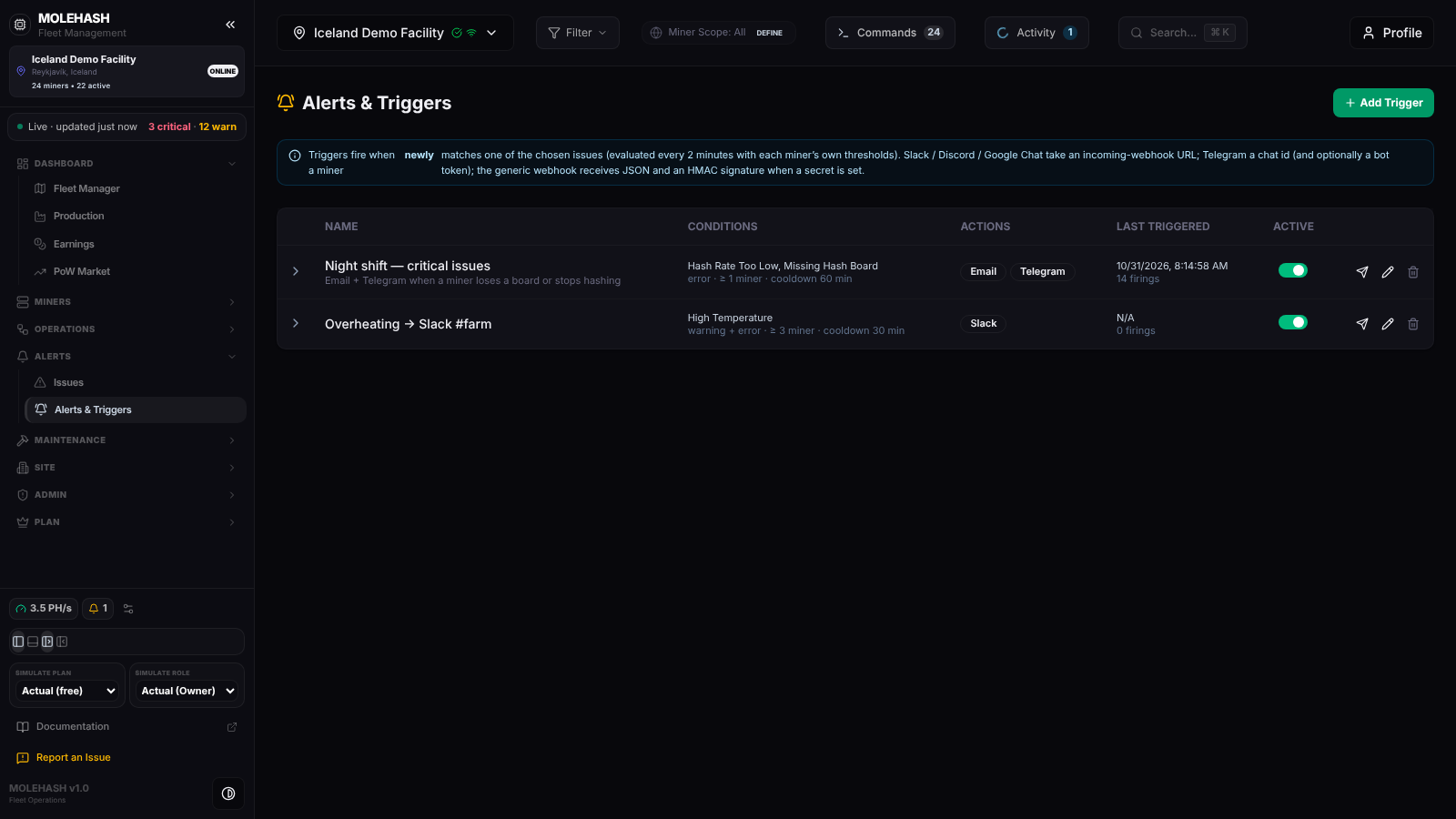 Two triggers on the Iceland Demo Facility: e-mail plus Telegram for critical issues, Slack for overheating.
① Header — the title and Add Trigger. Under it, a blue reminder of the rule: Triggers fire when a miner newly matches one of the chosen issues (evaluated every 2 minutes with each miner's own thresholds) and what each channel needs.
② Triggers table
| Column | Meaning |
|---|---|
| ▸ | Expands the firing history. |
| Name | Trigger name, all sites when it is not bound to one site, and the description. |
| Conditions | The chosen issue names (or Any issue); underneath, the level (failing, warning or failing + warning) · ≥ n miner · cooldown n min · tags … · models …. |
| Actions | One badge per channel: Email, Telegram, Discord, Slack, Google Chat, Webhook, In-app notification. |
| Last triggered | Local time of the last firing (or N/A) and n firings. |
| Active | The on/off switch. |
| Icons | ✈ Send a test · ✎ Edit · 🗑 Delete. |
Empty table: No trigger yet. Add one to be notified when an issue appears.
③ Expanded history (last 50 firings) — What happened (n miner(s) tripped), Time triggered, Associated miner(s) (the first two names, +n, full list on hover), Condition met (issue names), Action(s) taken (a channel in green when delivered, in red with ✗ when it failed — hover for the error). Never fired yet. when empty.
How to …
How to add or edit a trigger
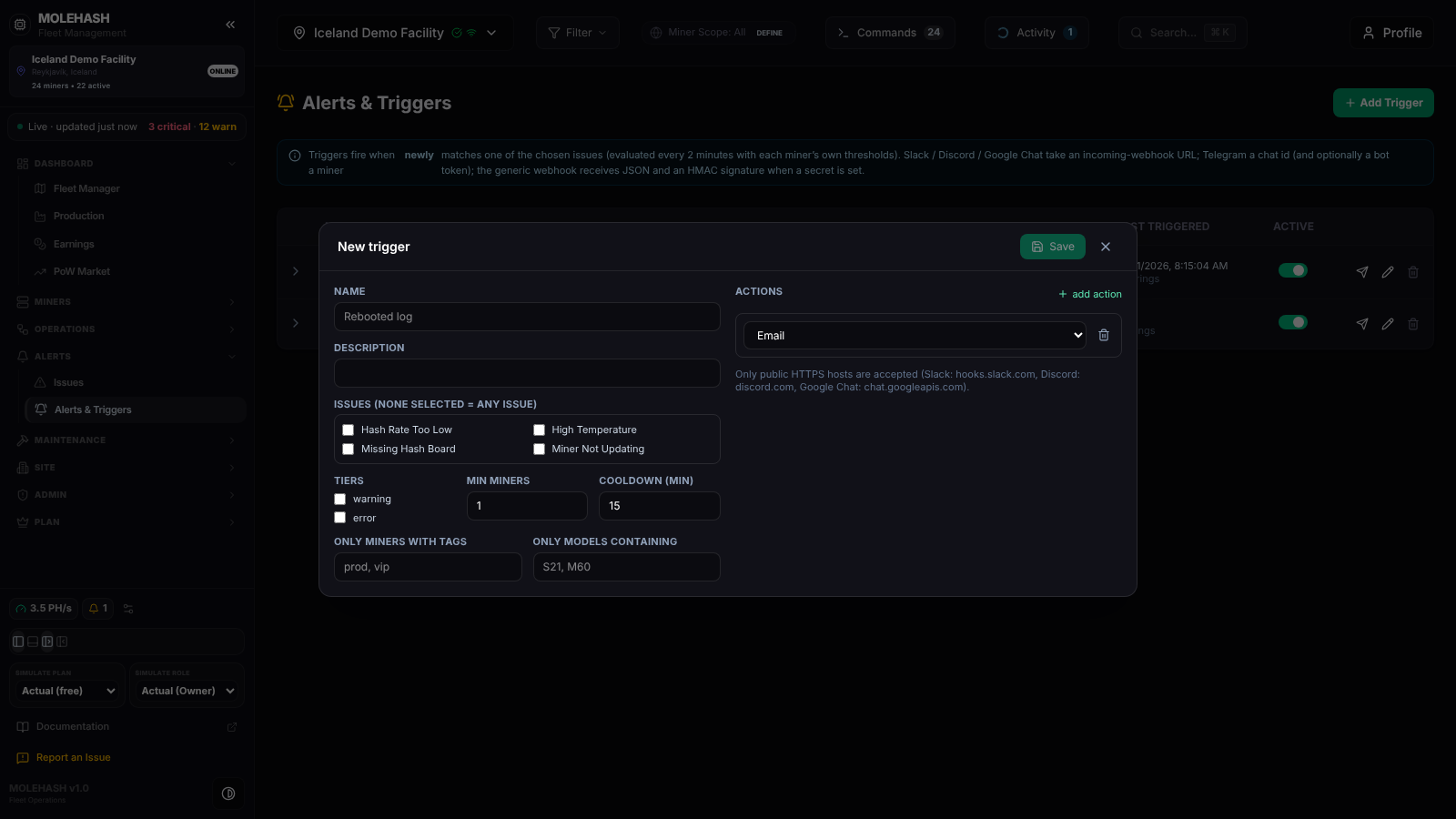 The New trigger dialog: issues, level, minimum miners, cooldown, filters on the left; notification channels on the right.
- Click Add Trigger (or ✎ on a row to edit). A new trigger starts with the failing level, 1 miner, a 15-minute cooldown and one In-app notification action.
- Name (required) and Description.
- Issues (none selected = any issue) — tick any of the built-in issues (Hash Rate Too Low, Missing Hash Board, Temp Sensor Too High, Miner Not Updating, Zero Hash Rate, Pool Unreachable, Pickaxe Offline …). Leave everything unticked to be told about any issue. Custom rules from the Issues page cannot be used here.
- Tiers — failing and/or warning (at least one). A warning-level event never notifies unless warning is ticked.
- Min miners — the trigger fires only when at least this many miners trip in the same 2-minute check. Use 3 or 5 on a large site to ignore single hiccups. Cooldown (min) — after a firing the trigger stays silent this long (0 = tell me every time).
- Only miners with tags / Only models containing — comma-separated; a miner must carry one of the tags, and its model must contain one of the strings (S21, M60).
- Actions — click add action for each channel and fill its target:
| Channel | What to enter | Notes |
|---|---|---|
| An address, for example ops@example.com | Subject Trigger: <name>. | |
| Telegram | The chat id (for example -1001234567890) | Optional bot token; without it the platform's bot is used — add it to your group first. |
| Discord | The incoming-webhook URL from your server settings | Messages are cut at 1 900 characters. |
| Slack | The incoming-webhook URL (hooks.slack.com/services/…) | |
| Google Chat | The space webhook URL (chat.googleapis.com/v1/spaces/…) | |
| Webhook | Any public HTTPS URL of your own | Receives the alert as JSON (trigger, site, time, count, conditions, up to 50 miners). With an optional signing secret every call carries an X-MoleHash-Signature header so you can verify it. 8-second timeout, redirects are not followed. |
| In-app notification | Nothing | A real-time notification in the web app for the site. |
Only public HTTPS hosts are accepted, and Slack, Discord and Google Chat URLs must be on their official hosts; otherwise saving fails with the reason. Every channel except In-app needs a target, and a trigger needs at least one action. 8. Click Save. Toast Trigger created or Trigger updated.
How to test a trigger
Click ✈ Send a test on the row. The message [MoleHash] Test of trigger '<name>': this is how its notifications will look. goes through every action and a toast reports each channel: Email: ok · Slack: HTTP 404. Tests are not written to the history. Do this once after creating a trigger — it is the quickest way to catch a wrong webhook URL.
How to pause or delete a trigger
- Flip the Active switch to stop or resume a trigger immediately; its history is kept.
- 🗑 Delete asks Delete trigger "<name>" and its history? and removes both.
How to read a firing
Expand the row. Each line is one firing: how many miners tripped, when, the first miners (hover for all of them), which issues, and which channels delivered. A red channel means the message did not go out — hover for the error (an HTTP code, a host that is not allowed, a mail failure), fix the target with ✎ and Send a test again.
Good to know
- How the check works — every 2 minutes the platform evaluates every miner with its own limits and ignore flags (see Issues) and compares with the previous check. Only miners whose state changed count as newly tripped, so a problem that persists notifies you once, not every 2 minutes. If the problem clears and comes back, it fires again (subject to the cooldown).
- What the message says — [MoleHash] <trigger>: n miners tripped (<site>), the conditions, and up to 10 lines • <miner> (<ip>): <issues>.
- Nothing fires although the Issues page shows the problem: the miner was already in that state when you created the trigger. Triggers react to changes; use Send a test to validate the channel meanwhile.
- The cooldown applies to the whole trigger, not per miner.
- A trigger created with no site selected covers all sites you can access.
- The page loads when you open it; reload it to refresh the Last triggered column.
- The e-mails about low voltage and power loss found by the log patrol are not triggers: they always go to the site owner and the members with
alerts:manage. See Activity.
Related
- Issues — the issues, limits and ignore flags that feed triggers
- Activity — log patrol alerts and their e-mails
- Site Management — members and roles (
alerts:manage)