
Mole Agents
A Mole agent (older screens say pickaxe) is a small program running on a computer inside your farm. It is the only thing that talks to your miners: it finds them on your IP ranges, reads their figures, uploads them to Mole Hash, carries out the commands you send from the dashboard (reboot, pools, power modes, firmware) and fetches logs. The Mole Agents panel shows your agents and their health, lets you tune them, and holds the install guide and diagnostics.
Where: sidebar Miners → Mole Agents · needs the discovery:view permission.
How it fits together
 The agent sits in your private network; only it talks to the miners. It calls the platform over HTTPS; nothing calls into your farm.
What you need:
- a Linux box (a small server, a VM, a Raspberry Pi) inside the farm network, able to reach the miners' IP ranges directly (no firewall between it and the racks);
- outbound HTTPS from that box to the platform. No inbound port, no VPN: the agent always initiates the connection;
- the site's Site ID and API key, shown at the top of this panel.
Rough sizing for an ASIC fleet: 2 CPU cores, 4 GB RAM, 20 GB disk and a wired 1 Gbps link. Requirements grow with the number of miners and ranges.
What you see
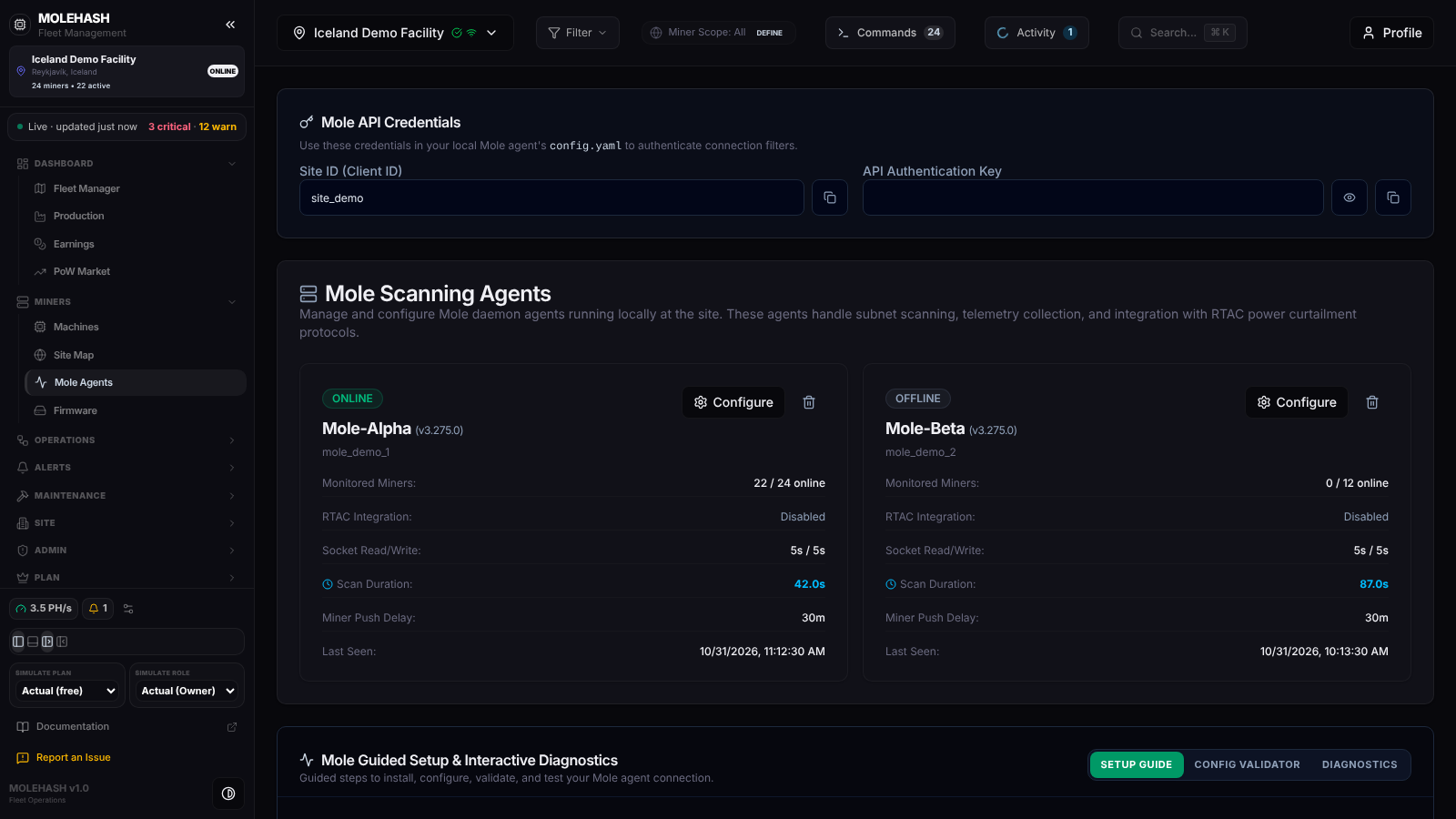 The demo site: credentials card, two agent cards (one online, one offline) and the setup / diagnostics tabs.
① Mole API Credentials — Site ID (Client ID) and the masked API Authentication Key, each with a copy button (the eye reveals the key). These are what an agent needs to belong to this site.
② Mole Scanning Agents — one card per agent that has ever reported, or No Mole Agents Detected until the first one connects.
| Field | Meaning |
|---|---|
| ONLINE / OFFLINE | Online while the agent has reported within the last 10 minutes. After 20 minutes of silence the site itself is marked offline and an alert is raised. |
| FIELD · subnet · until HH:MM | A field agent: a technician's laptop that only forwards IP Report presses for slot mapping — no scanning, no commands. |
| Name (version) | The agent's name and the version it reported last, e.g. Mole-Alpha (v3.275.0). |
| id | The identifier written in its configuration. |
| Monitored Miners | active / total online at the last report. |
| RTAC Integration | Power-curtailment protocol link: Enabled (ip:port) or Disabled. |
| Socket Read/Write | Timeouts in seconds used when talking to a miner. |
| Scan Duration | How long the last scan cycle took. If it gets close to the scan interval, uploads arrive late and the site may flap offline. |
| Miner Push Delay | Minutes between telemetry uploads. |
| Last Seen | Time of the last report. |
Each card has Configure and a trash icon (delete, after a confirmation; a running agent reappears at its next report).
③ Mole Guided Setup & Interactive Diagnostics — three tabs: Setup Guide, Config Validator, Diagnostics.
What the agent does
 One scan cycle, and the command worker that runs beside it.
Finding miners versus polling them. On its first cycle, and then every 12th cycle, the agent does a full sweep: it probes every address of every range you gave it, which is how new miners are found. In between it only polls the miners it already knows — one request each, which is fast (about 12 seconds for 2 300 miners) and gentle on your switches. A rack that was just powered on is usually noticed within a cycle anyway, because the agent samples a few addresses of empty ranges each time. Miners that stop answering are reported as offline so the dashboard flags them.
What it reports. For each miner: model, status, hashrate, temperatures, power, fans, uptime, firmware family and version, serial, MAC, pools, errors, and — since v3.285.0 — every hashboard with its working and expected chips, board / chip / inlet / outlet temperatures, voltage and serial. After the upload it sends a short heartbeat (version, miner counts, host CPU and RAM). If the platform is unreachable the batch is kept locally and sent later.
Command worker. In parallel, the agent asks the platform every 5 seconds for queued commands (every second while there is a backlog), runs them on the miners — reads, reboot, restart mining software, stop / resume, locate LED, power limit, power mode, fan mode, pool change, log fetch, firmware install — and reports each result. It checks the outcome (a reboot waits for the miner to actually go down, stop / resume checks whether the miner is hashing). A command for an address outside its ranges is refused. Then it re-reads the miners it touched 20 seconds and 2 minutes later and uploads, so the dashboard shows the effect of a reboot or a start without waiting for the next full cycle.
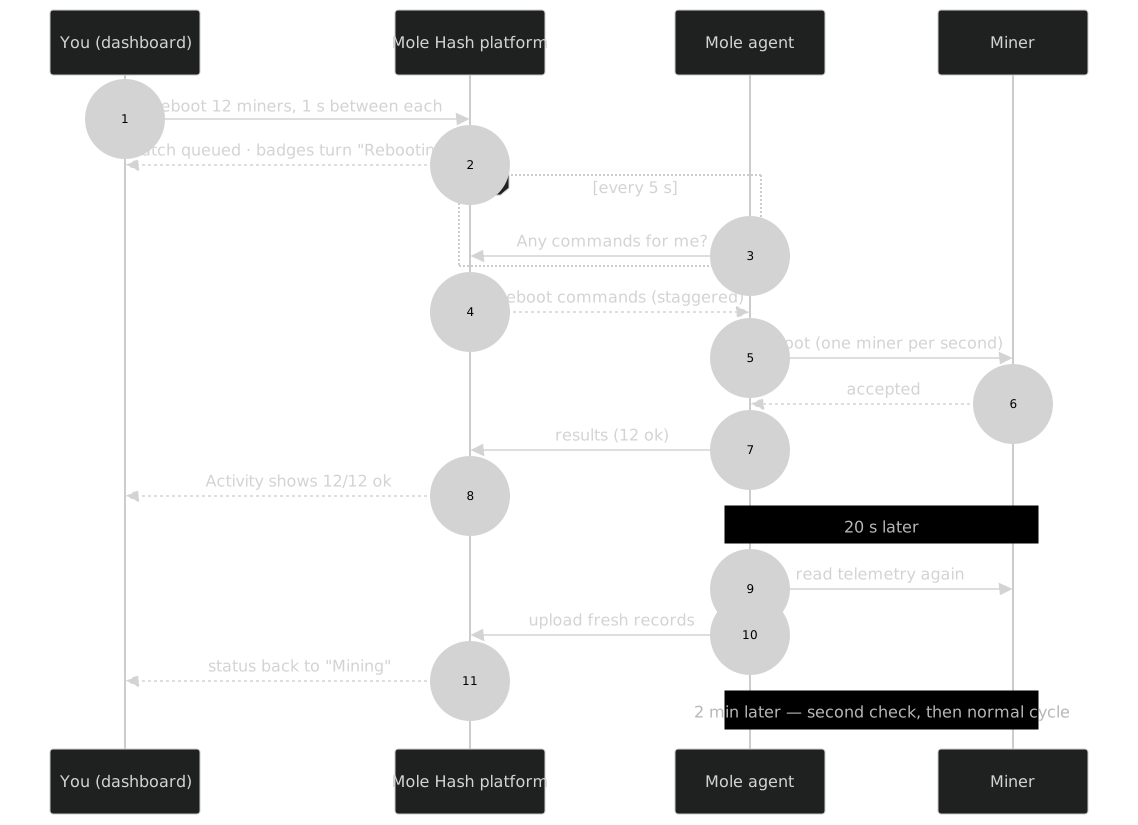 What happens between your click and the status badge turning back to Mining.
Log patrol. Every 10 minutes the platform asks the agent for the logs of 5 miners of the site (never the same miner twice within 6 hours) and scans them for low voltage, PSU faults, dying fans, overheating and lost boards. Those logs are what Search Miner Logs on Machines searches.
IP Report. The agent also listens for the IP Report button of your miners and forwards each press to the Site Map for slot mapping.
Automatic updates
You never update an agent by hand. The platform always serves the newest agent; at the start of every cycle the agent compares its version with it. When a newer one exists it downloads it from the platform it is configured for, over HTTPS, checks that the file's SHA-256 matches the one the platform announced, keeps a backup of the old file, swaps the new one in and exits — the service (systemd or Docker) restarts it within seconds on the new version. A download that fails the checksum or that does not pass a sanity check is discarded and the current version keeps running.
How to …
How to install an agent (Setup Guide)
- Open the Setup Guide tab. Pick 1. Hardware Environment (ASIC Miner Cluster or GPU Mining Rig) and 2. Target Operating System (Linux (Systemd), Linux (Docker), Windows). The requirements box adapts.
- Execution Commands gives you the command to copy. For Linux (Systemd) it is one line that already contains your Site ID, API key and the ranges to scan; paste it in a terminal on the farm box. For Docker and Windows see Install & configure, which also covers what the installer sets up.
- Within one scan interval the agent appears under Mole Scanning Agents as ONLINE, and Machines starts filling.
The Create Config File block shows the equivalent configuration file for people who prefer to install by hand.
How to configure an agent
- Click Configure on its card. The Configure Mole dialog opens; a note reminds you that changes take up to 2 minutes to reach the agent (it reads its settings at the start of each cycle).
- The network tab holds what you will actually touch:
| Setting | What it does |
|---|---|
| Subnet Ranges (CIDR format) | The ranges the agent scans, one per line, Add Subnet to add one, trash to remove (at least one stays). Keep them tight: one /25 per rack VLAN rather than a /16. |
| Scan Interval (seconds) | Time between two cycles, i.e. how fresh your dashboard is. It paces the agent directly. The form offers 300 s; 120 s is the recommended value for a normal farm (the agent never goes below 30 s). |
| Scan Timeout (seconds) | How long to wait for a miner to answer before giving up on it (5 s). |
| Max Concurrent Scans | How many miners are probed at once (50). Raise it only on a capable host and network. |
| Scan Ports (comma separated) | Ports probed when looking for miners. |
| Auto Scan Enabled | Switch scanning off entirely (the agent then only runs commands). |
| Cron Interval (minutes) | Kept for older agents; the scan interval is what counts. |
The timeouts and threads tabs tune batch sizes and worker pools; ppm holds the RTAC curtailment link with a test button; env passes extra environment variables. Resource-based defaults lets you type the box's CPU cores and RAM and loads a recommended set of values into the form; Reset to defaults loads the system defaults. Nothing is saved until you click Apply (toast Configuration Applied).
How to validate a configuration file (Config Validator)
Paste the content of a config.yaml, click Run Configuration Validation. You get a list of errors and warnings, a redacted preview of the credentials found, and a Next Action Step.
How to run diagnostics
Open Diagnostics, choose an agent and click Run Connection Test Suite. Ten checkpoints come back as PASSED / WARNING / FAILED / UNAVAILABLE: process status, configuration, API key, client id, platform connectivity, site assignment, miner subnet connectivity, miner discovery, metric submission, metric ingestion. They are computed from what the agent last reported, not from a live probe of the host.
Troubleshooting
- Agent OFFLINE: on the box, check that the service runs (
systemctl status mole-agent, logs withjournalctl -u mole-agent -f; Docker:docker logs -f mole-agent), that the credentials match the card at the top of this panel, and that the box can open HTTPS to the platform. Then run Diagnostics. - Miners show "not reported" / no chips or boards: the agent is older than v3.285.0. It updates itself at its next cycle; if it does not, re-run the install command.
- Slow scans with a huge range list: a full sweep probes every address of every range. Scan Duration on the card tells you how long it takes; split ranges per rack VLAN, remove empty ones, and remember that between sweeps only known miners are polled.
- New rack not found: it is picked up at the next full sweep at the latest (12 cycles, about 25 minutes at 120 s).
- Agent behind a firewall: the agent only needs outbound HTTPS (port 443) to the platform. Allow that destination; nothing needs to be opened inbound. If a proxy intercepts TLS the agent refuses the connection — add an exception for the platform host.
- Commands stay queued: the agent must be online; a command fails if no agent picks it up within 3 minutes. An address outside the agent's ranges is refused — add the subnet in network.
Related
Technical note
The agent is a single Python file run from a virtual environment under /opt/mole with its config.yaml next to it; the systemd unit is mole-agent.service. Self-update rewrites that file (keeping a .bak) and exits with code 0 so Restart=always (or the Docker restart policy) brings the new version up. The full-sweep cadence can be changed with the environment variable MOLE_DISCOVERY_EVERY (default 12 cycles).