
Roles & Permissions
Access in Mole Hash is granted per site. Each member of a site holds one role, and a role is a list of permissions. Four system roles — Owner, Admin, Operator, Viewer — come with every site, plus a ready-made Repair Technician role; owners and admins can add custom roles for anything in between. The Role Management panel lists the roles of the current site and lets you edit the custom ones.
Where: sidebar Admin → Role Management · needs the roles:view permission to open and roles:manage to create, edit or delete custom roles · the owner's plan caps custom roles: 1 on Free, 10 on the paid plans. The same editor also lives under Site Management → Access → Roles & Permissions.
What you see
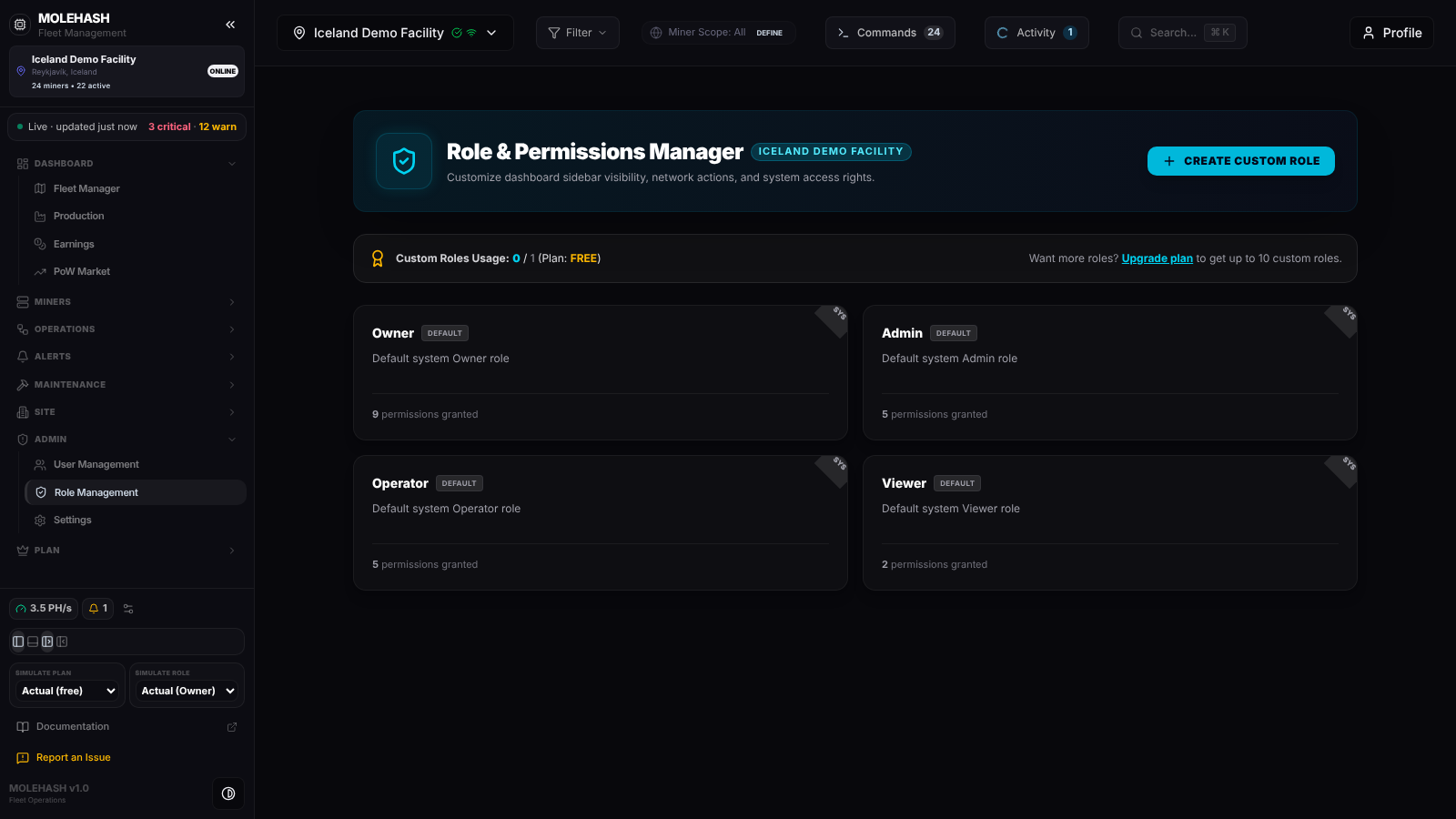 The demo site's four system roles, with no custom role yet on the Free plan.
① Header — Role & Permissions Manager with the current site's name and the Create Custom Role button. With no site selected the panel shows No Site Selected.
② Plan strip — Custom Roles Usage: n / max (Plan: …). On the Free plan the owner sees an Upgrade plan link for up to 10 custom roles.
③ Role cards — one per role: name, a Default tag for system roles, description and the number of permissions granted. Custom roles carry a pencil (Edit custom role) and a trash icon (Delete custom role); system roles are read-only.
What each permission lets a person do
Default roles: O = Owner, A = Admin, Op = Operator, T = Repair Technician, V = Viewer. The owner always has everything.
| Permission | The person can… | O | A | Op | T | V |
|---|---|---|---|---|---|---|
site:view | open the site and read its dashboards | ✓ | ✓ | ✓ | ✓ | ✓ |
site:update | edit site details, the API key, the power cap, scheduled reports, trusted pools and site pool connections; download the agent | ✓ | ✓ | |||
site:delete | delete the site | ✓ | ||||
members:view | see the member list and invitations | ✓ | ✓ | ✓ | ||
members:invite | invite people, resend or revoke invitations | ✓ | ✓ | |||
members:remove | remove a member | ✓ | ✓ | |||
members:role_update | change or suspend a member's role | ✓ | ✓ | |||
roles:view | open Role Management | ✓ | ✓ | |||
roles:manage | create, edit and delete custom roles | ✓ | ✓ | |||
miners:view | see the miners and their data | ✓ | ✓ | ✓ | ✓ | ✓ |
miners:create | add miners | ✓ | ✓ | |||
miners:update | edit miners: IP, pools, credentials, rack slot, mapping | ✓ | ✓ | ✓ | ✓ | |
miners:delete | remove miners | ✓ | ✓ | |||
miners:control | send commands: reboot, pause, change pool, install firmware, curtail power | ✓ | ✓ | ✓ | ||
power:view | read energy, transformer and power figures | ✓ | ✓ | ✓ | ✓ | |
power:manage | operate power switches, thresholds and phase loads | ✓ | ✓ | |||
alerts:view | see issues and triggers | ✓ | ✓ | ✓ | ✓ | ✓ |
alerts:manage | acknowledge or mute issues, edit rules and triggers | ✓ | ✓ | |||
tickets:view | read tickets and comment on them | ✓ | ✓ | ✓ | ✓ | ✓ |
tickets:manage | create, assign and work tickets | ✓ | ✓ | ✓ | ✓ | |
audit:view | read the site's audit log | ✓ | ✓ | |||
work_orders:view | read work orders | ✓ | ✓ | ✓ | ✓ | ✓ |
work_orders:manage | create and update work orders | ✓ | ✓ | ✓ | ✓ | |
inventory:view | read the parts inventory | ✓ | ✓ | ✓ | ✓ | ✓ |
inventory:manage | adjust stock, add locations and alert rules | ✓ | ✓ | ✓ | ✓ | |
calendar:sync | synchronise maintenance with a calendar | ✓ | ✓ | ✓ | ✓ | |
facility_map:view | open the 3D site map | ✓ | ✓ | ✓ | ✓ | ✓ |
facility_map:manage | edit racks, rows and slots on the map | ✓ | ✓ | ✓ | ✓ | |
vlan:view | read networks and subnets | ✓ | ✓ | ✓ | ✓ | |
vlan:manage | edit networks and subnets | ✓ | ✓ | ✓ | ||
discovery:view | see the Mole agents and scan results | ✓ | ✓ | ✓ | ✓ | |
discovery:manage | run scans, manage agents and scheduled tasks | ✓ | ✓ | ✓ | ||
social:post | post part needs and offers on the marketplace | ✓ | ✓ | ✓ | ✓ | |
revenue:view | see money: the Earnings page and every revenue figure | ✓ | ✓ | ✓ | ✓ |
Repair Technician is created with every site like the four system roles, but it is not protected: the panel tags it Custom, counts it in your custom-role usage and lets you edit or delete it.
Superusers bypass every check. The person who created the site (its owner) is treated as holding every permission. A member whose role was removed (Suspended) has no permission at all.
Which sidebar items each permission unlocks
The sidebar hides any item whose permission you lack on the current site. Hiding is a convenience: the server checks the permission again on every action.
| Permission | Sidebar items |
|---|---|
site:view | Fleet Manager, Production, PoW Market, Activity, Reports, Security, Workers, Operator Stats, Site Management |
revenue:view | Earnings |
facility_map:view | Site Map |
miners:view | Machines, Pools |
miners:control | Commands, Firmware, Power & Curtailment |
discovery:view / discovery:manage | Mole Agents / Scheduled Tasks |
power:view | Energy |
alerts:view | Issues, Alerts & Triggers |
tickets:view / tickets:manage | Tickets / Planning, Repair |
inventory:view | Inventory |
roles:view | Role Management |
| superuser only | User Management |
| account owner (or superuser) | Plans & Pricing |
Settings is always available. Without a selected site, every permission-gated item is hidden for non-superusers.
Hiding money from some members
Remove revenue:view from a role and its members no longer see the Earnings page, the revenue tile on the overview or the revenue figures on Production. Every role that existed when this permission was introduced received it once; the platform never adds it back by itself, so a farm that removes it keeps it removed. Repair Technician does not have it by default.
How to …
How to create a custom role
- Click Create Custom Role. When the plan cap is reached the button answers Plan Limit Reached.
- Enter a Role Name (required) and a Description, then tick the permissions, grouped by Site, Members, Roles, Miners, Power, Alerts, Tickets, Audit, Work Orders, Inventory, Calendar, Facility Map, Networks, Discovery and Revenue.
- Click Save Role. Banner: Custom role created successfully. A name already used on the site is refused.
TIP
This editor does not enforce view / write pairs: granting miners:control without miners:view hides the Machines page while still allowing commands. The editor under Site Management → Access ticks the matching view permission for you — prefer it when in doubt.
How to edit or delete a custom role
- Pencil: same form, then Save Role → Role updated successfully.
- Trash: confirm, then Custom role deleted successfully. Members holding the role keep their membership but lose all permissions until they are given another role.
- System roles cannot be changed: Default system roles cannot be modified.
How to give a role to a member
Roles are assigned in Site Management → Access → People & Invitations: pick the role when inviting, or click Role on an existing member.
Good to know
- The panel reloads after every change; your own permissions are refreshed about once a minute, so a change to your role can take up to a minute to show in the sidebar.
- A member cannot see a page you expect? Check the role against the sidebar table above, then that the right site is selected.
- Plan limit reached when creating a role: delete an unused custom role or upgrade the owner's plan.
- Renaming a custom role is allowed; the four system role names are reserved.
- Money hidden for everyone?
revenue:viewwas removed from the role; add it back in the editor.