
Scheduled Tasks
Scheduled Tasks runs one miner command on a chosen group of miners at fixed times: stop the miners of transformer T2 at 05:00, wake them at 22:00, reboot a rack every night, read a value every hour. Each run goes through the site's Mole agent (the "pickaxe") like a manual command and records a per-miner result. The page also carries the Power schedules card, a short view of the repeating curtailments and power targets managed in Power & Curtailment.
Where: sidebar Operations → Scheduled Tasks · needs the discovery:manage permission to open the page and miners:control on the site to create, edit, run, pause or delete tasks · plan: the header badge shows your quota, for example PLAN: FREE (1/1).
What you see
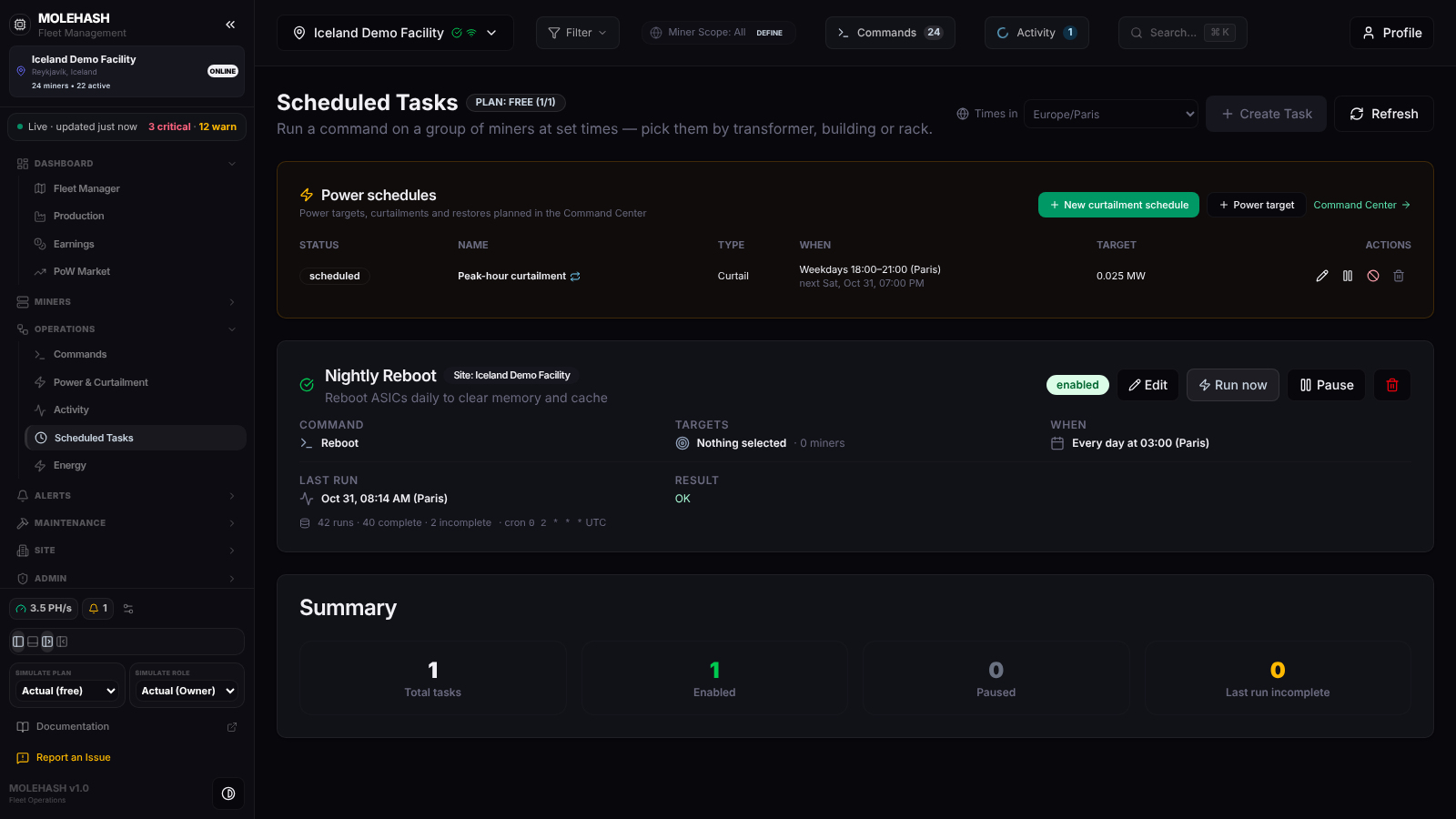 Scheduled Tasks on the Iceland Demo Facility: one power schedule, one nightly reboot task and the summary.
① Header — title with the PLAN badge (tasks used / allowed), Times in (the time zone used to display and enter every time on this page — shared with Power & Curtailment and remembered in your browser), Create Task and Refresh.
② Power schedules card — the site's active power events, refreshed every minute: Status, Name (↻ when repeating), Type (Curtail, Power target, Restore, Power mode → x), When (Weekdays 18:00–21:00 (Paris) · next Sat, Oct 31, 07:00 PM), Target, and the row icons ✎ Edit, ❚❚ Pause, ▶ Resume, ⃠ Stop, 🗑 Delete. New curtailment schedule and Power target open the power-event dialog prefilled as a daily event at 70 % of site power; Command Center → takes you to the full Power & Curtailment page.
③ Task cards — one per task:
| Field | Meaning |
|---|---|
| Badge | enabled (green check) or paused; Site: <name>. |
| Command | What runs, for example Reboot or Stop mining (sleep). |
| Targets | The group in words (Transformer T2 + T3, Rack B1-R30 …) or n miners. An amber note n id(s) no longer on the site — Edit and save to clean up appears when some miners were removed since. |
| When | Every day at 03:00 (Paris), Mon, Wed at …, Every hour, Every 15 minutes …, with … your time when your browser's zone differs from Times in. |
| Last run | Date in the chosen zone, Never, or Running now…. |
| Result | Per-miner counts of the last run: ✓ n done, … n no response (offline or did not answer in time), ✕ n failed, n skipped (the firmware cannot run this command), n cancelled; or the reason the run could not start (for example no agent online); or Not run yet. |
| Footer | n runs · n complete · n incomplete · cron <expression> UTC. |
| Buttons | Edit, Run now, Pause / Start, 🗑. |
④ Summary card — Total tasks, Enabled, Paused, Last run incomplete.
How to …
How to create a task
- Click Create Task. If your plan quota is used up you get Plan Limit Reached instead. The Create Scheduled Task form opens under the header.
- Enter a Task Name (required) and an optional Description.
- Choose the Command from the searchable list — the same commands as the Commands page (Reboot, Stop mining (sleep), Resume mining (wake), Restart mining software, Locate LED on/off, the Get … reads, Set Power Limit 1000 … 3000 W, Change Pool …). Site is the site whose miners you will pick (locked when editing).
- When → Repeat:
- Every day at… or On selected days at… with a Time and a Time zone; for selected days, toggle the Mon … Sun chips (at least one).
- Every hour, Every 15 minutes, Every 5 minutes, Every minute (testing).
- Custom cron expression (UTC) — five fields, for example
0 2 * * *for 02:00 UTC every day. A preview line reads the schedule back to you (Every day at 05:00 (Paris), … your time if different) and shows how it is stored as … UTC. A note reminds you that zones with daylight saving shift by one hour at the clock change: re-save the task then, or use a zone without DST.
- Who — the target picker: chips per Transformer and Building (plus Not in a rack), an expandable Racks (n) list, Select all / Clear, and a searchable list of single miners (Search by IP, name or rack). At least one miner is needed, otherwise No Miners Selected.
- Click Schedule Task. Toast: Cron Task Created — Every day at 05:00 (Paris) · 312 miner(s). Possible refusals: Schedule Required (a custom expression needs five fields), Pick at least one day, or the plan's own limit (Creation Failed with the reason).
How to edit a task
Click Edit on the card. The same form opens prefilled, with the schedule shown in the current Times in zone. Miners that no longer belong to the site are dropped when you save. Click Save changes → toast Task updated.
How to run, pause or delete a task
- Run now → confirm Run "<command>" on n miner(s) right now? → the task runs immediately (toast Scheduled Command Triggered). Handy to test a new task before its first scheduled time.
- Pause / Start — a paused task keeps its definition but never fires.
- 🗑 → Are you sure you want to delete this scheduled task? → the task and its history are removed.
How to manage a power schedule from here
Use the row icons in the Power schedules card: ✎ edits the event, ❚❚ pauses a scheduled one, ▶ resumes a paused one, ⃠ stops it (a running event puts its miners back; a repeating one ends the whole schedule), 🗑 deletes it. New curtailment schedule and Power target create new ones — the dialog is described on the Power & Curtailment page.
Good to know
- Plan quota — the free plan allows 1 task, lite 3, pro 10, enterprise 100; the plan also sets a minimum interval between runs and a maximum number of miners per run. The limits are those of the site owner's plan (Scheduled jobs are billed to the site owner's plan), and the refusal message names the limit that was hit.
- Where runs appear — every execution is listed in Activity → Runs history under the Cron kind (Cron · <schedule>), with the per-miner results; the top-bar Activity panel shows it live and its Scheduled tab lists the task with its next run. A live run can be cancelled from there.
- What happens at run time — the platform checks every minute; miners whose firmware cannot run the command are skipped; if no Mole agent has reported in the last 10 minutes the run fails with No agent online on this site. The platform then waits up to 12 minutes for the agent's answers; a miner that does not answer counts as no response, and any failed or unanswered miner marks the run incomplete.
- The list reloads when you open the page and when you click Refresh; there is no background refresh of the task cards.
- Times look wrong? Check Times in: everything on the page is shown in that zone, and the stored expression is always UTC.
- Empty state: No scheduled tasks yet — the Power schedules card may still show events.
- A task cannot target miners of another site.
Related
- Commands — the commands and the queue
- Power & Curtailment — power schedules in full
- Activity — run history and cancellation
- Plans & Pricing — task quotas per plan