
Energy
The Energy panel answers "how much power did the site draw, what did it cost, and how efficient is the fleet?". It plots the site's power over time from the readings the Mole agent (the "pickaxe") uploads, sums them into energy and cost for the period you choose, and draws the hourly fleet efficiency in joules per terahash measured on the miners that report their power.
Where: sidebar Operations → Energy · needs the power:view permission.
What you see
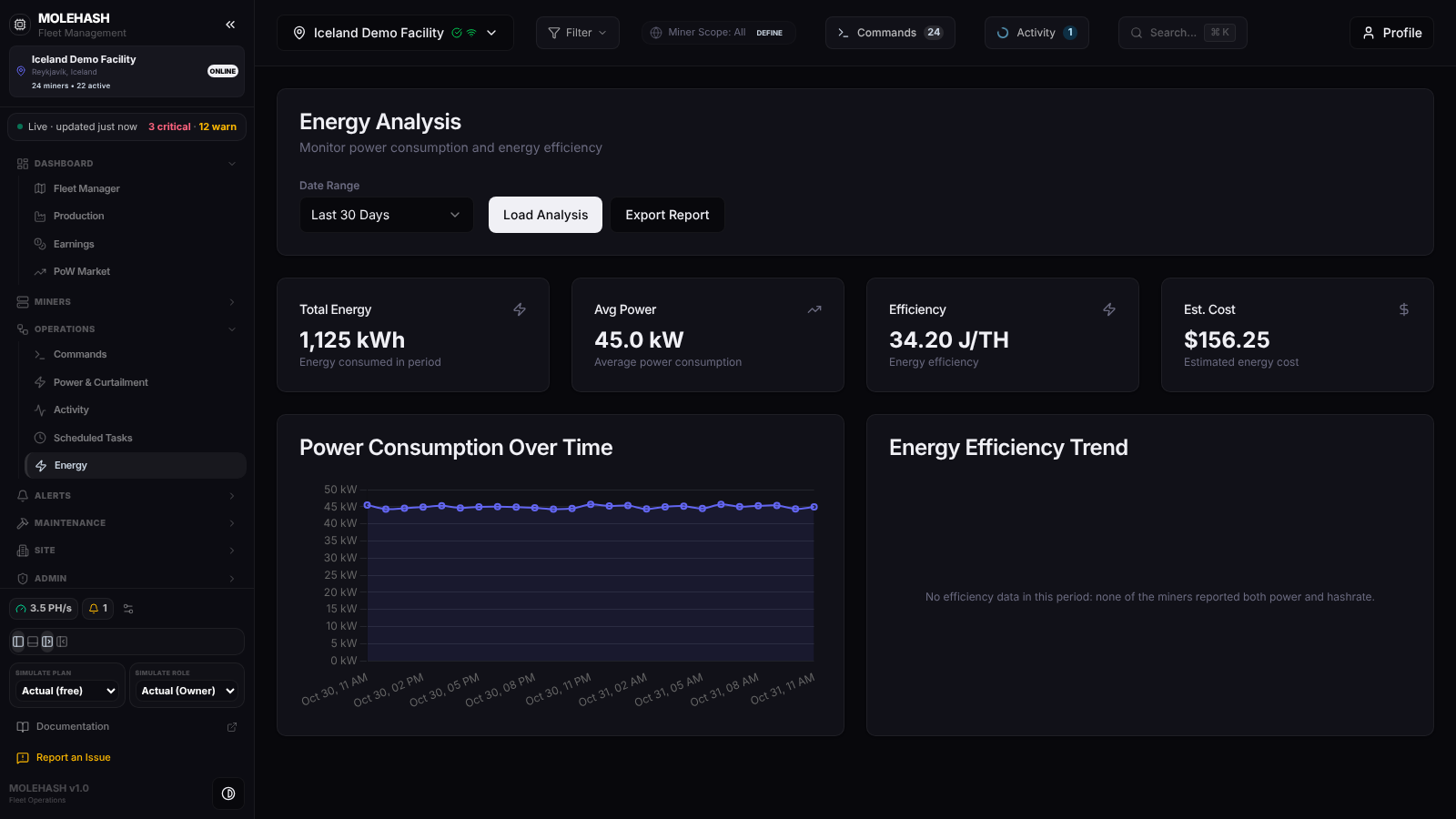 Energy on the Iceland Demo Facility over the last 30 days: the four KPI cards, the power curve and an empty efficiency trend.
① Energy Analysis card — Date Range (Last 24 Hours, Last 7 Days, Last 30 Days — the default —, Last 180 Days, Custom Timeframe), the Load Analysis button and Export Report. With Custom Timeframe, Start Date and End Date pickers appear (an empty start means 30 days ago, an empty end means now). Export Report is not wired up yet: clicking it does nothing in the current build.
If a global filter is active, a banner says Showing energy metrics filtered by global scope: "…". The energy history itself is always for the whole site; only the live fleet figures used as fallbacks follow the filter.
② KPI cards (shown once the site has readings)
| Card | Value | How it is worked out |
|---|---|---|
| Total Energy | kWh | Sum of the energy of every reading in the period. If the readings carry no energy yet, the card falls back to current fleet power × 24 h × number of days. |
| Avg Power | kW (W for small sites) | Average of the power readings in the period; falls back to the live fleet power. |
| Efficiency | J/TH | The live fleet efficiency when the miners report it; otherwise the last point of the hourly trend; — when neither exists. Lower is better. |
| Est. Cost | $ | Sum of the cost stored with each reading. If none, current power × price × 24 h × days. The price is the site's energy cost per kWh, or 0.065 when the site has none. |
③ Power Consumption Over Time — the site's power in kW, one point per reading, filled from zero. Labels are hours on a 24-hour range and day + hour otherwise, in your local time. Dips are curtailments, sleeping miners or miners offline. Hover for the exact value; points are hidden on dense series. Empty state: No power readings in this period.
④ Energy Efficiency Trend — hourly J/TH computed only over miners that reported both power and hashrate in that hour. The subtitle states the basis: Measured on the miners that report their power (n miners, x kW). Stock firmware does not report power, so those miners are not in this curve. Empty state, as on the demo: No efficiency data in this period: none of the miners reported both power and hashrate.
How to …
How to look at a period
- Choose a Date Range. The page reloads on its own when the range or the site changes.
- For an exact window pick Custom Timeframe and fill Start Date and End Date.
- Click Load Analysis whenever you want a fresh read without changing anything.
How to get a real cost figure
- Open Site → Site Management, section Energy & Power, and fill Energy Cost ($/kWh).
- Come back and click Load Analysis. New readings are priced at the rate in force when they are written, so history keeps its original rate; the fallback estimate uses the current rate.
Note that the Power & Curtailment page has its own ⚙ form with a separate Power cost per kWh used by its 24-hour cost card; set both if you use both pages.
How to get efficiency for stock-firmware miners
Stock Bitmain firmware only reports wattage once the miner's web password is stored on the platform. Open the miner (Machines → Edit miner → credentials) and save the password; from the next agent upload those miners count as measured, enter the efficiency curve and stop being estimated in the power series.
Good to know
- What "—" means — no value could be computed: for Efficiency, no miner reports power; for a date, the reading had no usable time.
- How readings are made — the agent uploads roughly every few minutes; each upload writes one site-level reading: measured watts of the miners that report power, plus an estimate (hashrate × the model's nominal J/TH) for hashing miners that do not. Energy is the power multiplied by the time since the previous reading (capped at 15 minutes), and cost is energy × the site rate at that moment.
- No Energy Data Recorded — No energy consumption data has been synced to the database for this site. means no agent upload has produced a reading in the period. Check Miners → Mole Agents.
- The page has no background refresh: data loads on open, on range or site change and on Load Analysis. The efficiency trend can take up to 5 minutes to reflect new uploads on ranges longer than two days.
- A 180-day range shows the most recent 1 000 readings; narrow the range for older detail. The efficiency trend is capped at 180 days.
- The range can be shared by URL:
?range=24h|7d|30d|180d|custom&start_date=…&end_date=….
Related
- Power & Curtailment — live load, full site power and its own power cost setting
- Production — hashrate and production charts
- Machines — per-miner power and efficiency, Edit miner credentials
- Site Management — the site's energy cost per kWh