
Security
The Security panel answers can somebody on my network reconfigure my miners? It lists the miners known to still accept the firmware's default web password, shows how the stored credentials are spread across the fleet and how old the oldest one is, and lets you open Edit Miner to store a password. No password is ever displayed: Mole Hash only knows whether the default worked and which stored credential each miner uses.
Where: sidebar Site → Security · needs the site:view permission to read; storing a password goes through Edit Miner and needs miners:update · a site must be selected.
What you see
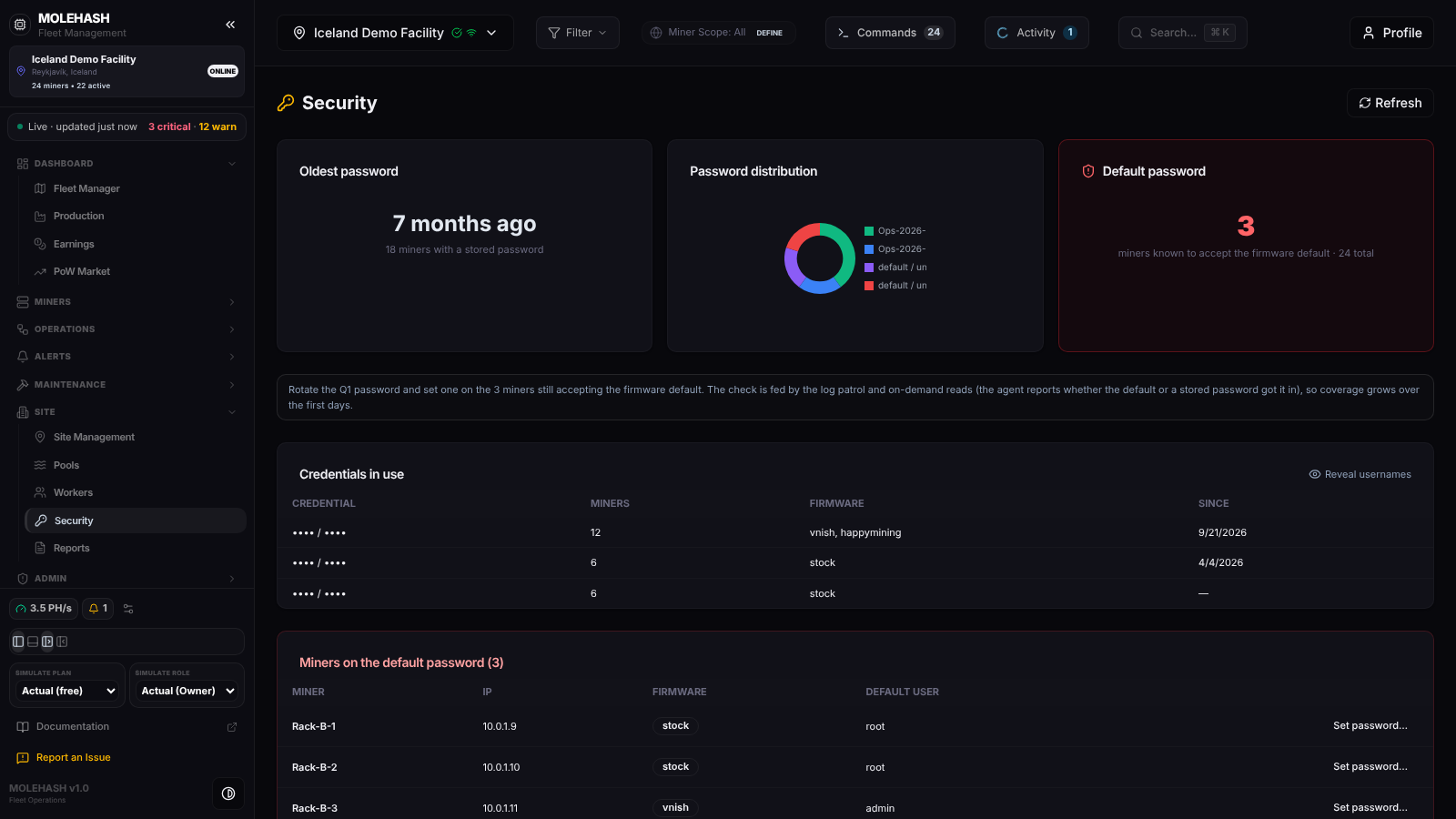 The demo site: 18 miners with a stored password, 3 still on the firmware default.
① Header — Security and Refresh.
② Summary cards
| Card | Meaning |
|---|---|
| Oldest password | Age of the oldest stored credential (today, N days ago, 7 months ago, N.N years ago, or unknown when nothing is stored) and the number of miners with a stored password. |
| Password distribution | A doughnut with one slice per distinct credential, plus a red default / unknown slice for miners with no stored credential. |
| Default password | Miners known to accept the firmware default, out of the site total. The card is red with a shield icon when the count is above 0, green with a check when it is 0. |
③ Advice line — reminds you that miners on the default password can be reconfigured by anyone on the network, and that the check is fed by the agent's log patrol and on-demand reads, so coverage grows over the first days.
④ Credentials in use
| Column | Meaning |
|---|---|
| Credential | username / •••• — the password is never shown, and the username stays hidden until you click Reveal usernames. |
| Miners | Miners sharing this credential. |
| Firmware | Firmware families where it is used (stock, vnish, happymining for Happy Mining firmware). |
| Since | Date the credential was first stored, or —. |
Empty state: No credentials stored yet — set them in Edit Miner (one at a time) or with the bulk action "Update Credentials".
⑤ Miners on the default password — shown only when the count is above zero. Columns: Miner, IP, Firmware, Default user (root, or admin on VNish firmware) and a Set password… button per line. The list stops at 500 miners.
How to …
How to reveal or hide usernames
Click Reveal usernames above the credentials table; it becomes Hide usernames. Only the username part is affected; passwords are never available.
How to store a password for a miner
- Click Set password… on the miner's line. The Edit Miner dialog opens.
- Fill Web username (root by default) and Web password, then Save. The password is stored encrypted and used by the Mole agent (older screens say "pickaxe") whenever it talks to the miner.
- The panel reloads. The miner leaves the default-password list once the agent confirms that the default no longer works.
TIP
Storing a password in Mole Hash does not change it on the miner. Change it in the miner's web interface first (or with the firmware's bulk tools), then store the same value here so the agent keeps control.
How to store the same password on many miners
Use the bulk action Update Credentials from Miners → Machines rather than this panel.
Good to know
- The panel reloads when you open it, switch site, save in Edit Miner, or click Refresh; it does not refresh on a timer.
- A miner counts as on the default password when the agent managed to log in with the default, or when it has no stored password and its web login is still set to the default. The agent learns this when it reads the miner during its log patrol or an on-demand read, so the count may be lower than reality during the first days.
- A miner with a stored password that still shows up in the default list means both passwords work: the default was never changed on the device. Change it on the miner.
- The doughnut's default / unknown slice includes miners for which nothing is stored yet, not only confirmed defaults; the red card is the confirmed count.
- Rotate shared credentials regularly: the Oldest password card is there to remind you.