
PoW Market
The PoW Market page follows the Proof-of-Work coins Mole Hash tracks — price, volume, network hashrate and difficulty — and ranks them by an opportunity score. It answers "which coin and algorithm would be worth mining with a given machine at my electricity price?". The figures are global market data, not your site's telemetry, so the page looks the same whichever site is selected.
Where: sidebar Dashboard → PoW Market · needs the site:view permission on the current site.
What you see
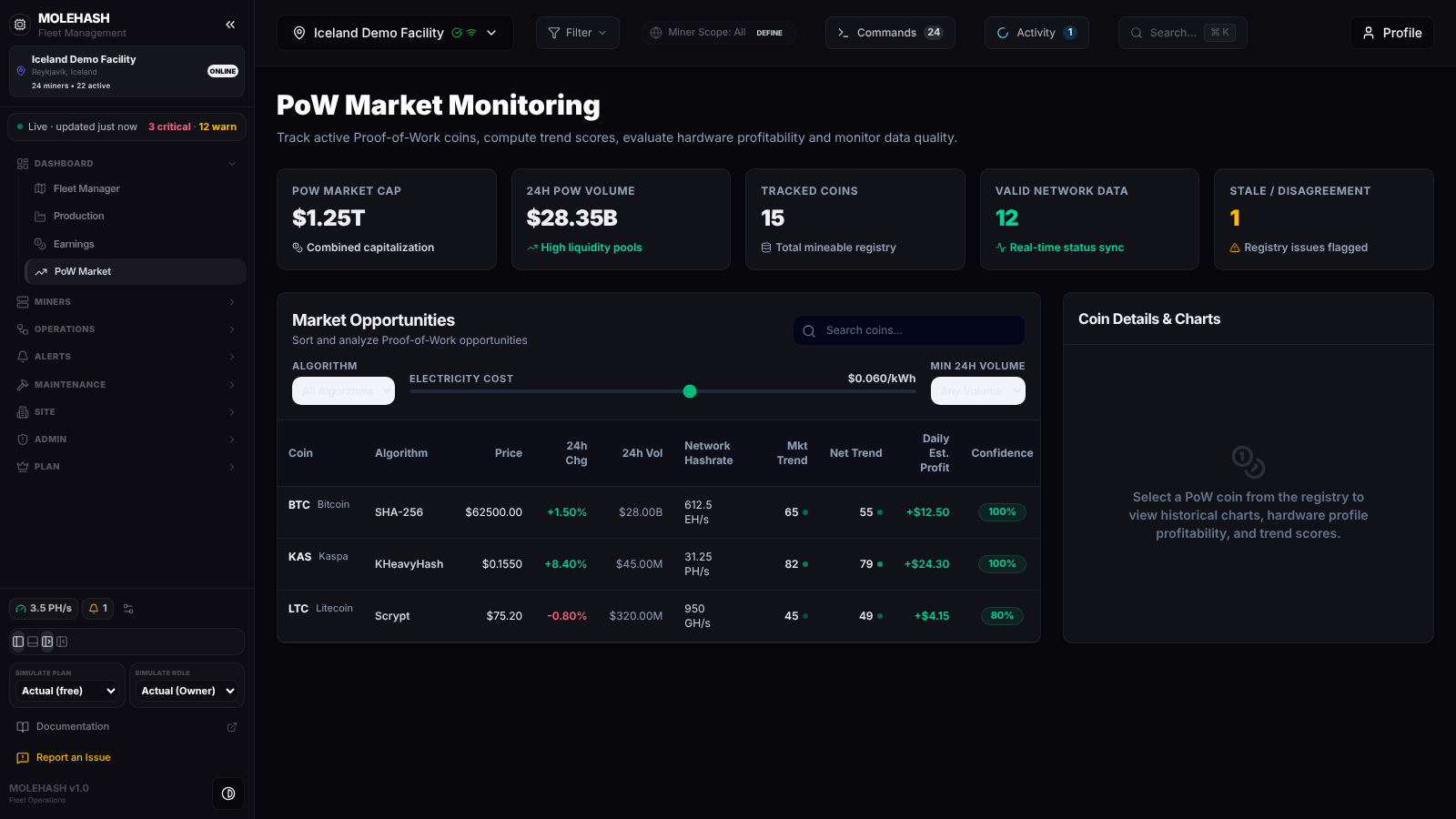 PoW Market Monitoring: 15 tracked coins, three shown here (BTC, KAS, LTC), no coin selected yet.
① Header — the title PoW Market Monitoring and a one-line description.
② Overview cards
| Card | Meaning |
|---|---|
| PoW Market Cap | Combined market capitalisation of all tracked coins |
| 24h PoW Volume | Their combined trading volume over the last 24 hours |
| Tracked Coins | Number of coins in the registry |
| Valid Network Data | Coins for which a network hashrate is known |
| Stale / Disagreement | Coins whose network figures are out of date (last refreshed more than two hours ago); amber when above zero |
③ Market Opportunities — filter bar
- Search coins… filters the list shown by name or symbol as you type.
- Algorithm — All Algorithms or one algorithm present in the registry (SHA-256, Scrypt, KHeavyHash…).
- Electricity Cost slider — from $0.010 to $0.100 per kWh in steps of 0.005; the default is $0.060. It drives the Daily Est. Profit column.
- Min 24h Volume — Any Volume, $10K+, $100K+ or $1M+.
④ Market Opportunities — table (up to 20 coins, best opportunity first)
| Column | Meaning |
|---|---|
| Coin | Symbol and name |
| Algorithm | Mining algorithm |
| Price | US dollars (two decimals above $1, four below) |
| 24h Chg | Price change over 24 hours; green when positive, red otherwise |
| 24h Vol | Trading volume over 24 hours, abbreviated (K, M, B, T) |
| Network Hashrate | Total hashrate of the coin's network |
| Mkt Trend | Market trend score from 0 to 100; the dot gets brighter as the score rises |
| Net Trend | Network trend score from 0 to 100 |
| Daily Est. Profit | Best profit per day among the reference machines that mine this algorithm, at the slider's electricity cost; green when positive |
| Confidence | How reliable the coin's data is: green at 80 % or more, amber from 50 %, red below |
The reference machines are fixed: an Antminer S21 235T for SHA-256 and an IceRiver KS5 Pro 21T for KHeavyHash. Coins on any other algorithm have no reference machine, so their "profit" is just the electricity cost shown as a loss.
⑤ Coin Details & Charts — empty until you click a coin ("Select a PoW coin from the registry…"). Once a coin is selected you get its name and symbol, its Opportunity Score, a quick grid (Price, Difficulty, Network Hashrate, Last Block) and three tabs:
- Charts — Price History (USD) and Network Hashrate & Difficulty (hashrate on the left axis, difficulty on the right) over the last 7 days.
- Hardware Profit — for each matching reference machine, the profit per day at four increasing electricity tariffs. "No hardware profiles match the algorithm" when none applies.
- Trend History — the Composite Trend Score over the same 7 days.
A Stale Data Warning appears under the tabs when the coin's network figures are more than two hours old.
WARNING
The four rows of Hardware Profit are labelled $0.04, $0.06, $0.08 and $0.10 per kWh, but the tariffs actually used to compute them are lower ($0.018, $0.045, $0.060 and $0.070). Read them as "four increasing tariffs", and use the Electricity Cost slider on the table for a figure at your own rate.
How to …
How to find the best coin for your electricity price
- Drag the Electricity Cost slider to your price per kWh.
- Optionally pick an Algorithm (the one your machines mine) and a Min 24h Volume to leave out thinly traded coins.
- The table reloads ("Loading PoW registry opportunity metrics…") and re-ranks the coins; read Daily Est. Profit and Confidence together.
How to search for a coin
- Type a name or symbol in Search coins….
- The list already on screen narrows as you type; clear the box to see every coin again.
How to inspect a coin
- Click its row; the row is highlighted.
- The details, charts and profitability load on the right. Switch between Charts, Hardware Profit and Trend History with the tabs.
Good to know
- Market figures are refreshed on the server about every 10 minutes. There is no refresh button; reload the page or change a filter to pick up new values.
- The page is not affected by the site selected in the header or by the global filter.
- "No coins match the active filters or search criteria": relax the algorithm, the minimum volume or the search text.
- A coin shows a loss at every tariff: either no reference machine mines its algorithm (only SHA-256 and KHeavyHash have one) or its reward does not cover the machine's power at that price.
- Red confidence: the coin's data sources disagree; treat its scores with care.
- A perfectly regular saw-tooth in the history charts means no real history has been recorded for that coin yet; the chart is drawn from its current values.
- Empty overview cards with a working table: the summary could not be loaded; try again later.